

http://m14hackersworld.blogspot.com
How to configure IDM extension for Chrome?

1.You need to press on Chrome menu (arrow 1 on the image), and select "Settings" menu item (arrow 2 on the image). Then select "Extensions" tab (arrow 3 on the image).
Check that "IDM Integration" extension is enabled (arrow 4 on the image). If you use incognito mode in Chrome, you need to enable "Allow in incognito" checkbox (arrow 5 on the image).
2.I deleted "IDM Integration" extension from Chrome by mistake. How can I reinstall it back?
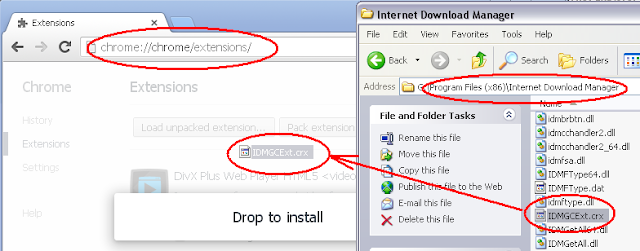
You need to open IDM installation folder ("C:\Program Files\Internet Download Manager" by default), then drag and drop "IDMGCExt.crx" file into "Extensions" page opened in your Chrome browser:
How to configure IDM extension for Chrome?

1.You need to press on Chrome menu (arrow 1 on the image), and select "Settings" menu item (arrow 2 on the image). Then select "Extensions" tab (arrow 3 on the image).
Check that "IDM Integration" extension is enabled (arrow 4 on the image). If you use incognito mode in Chrome, you need to enable "Allow in incognito" checkbox (arrow 5 on the image).

2.I deleted "IDM Integration" extension from Chrome by mistake. How can I reinstall it back?
You need to open IDM installation folder ("C:\Program Files\Internet Download Manager" by default), then drag and drop "IDMGCExt.crx" file into "Extensions" page opened in your Chrome browser:
if you want to download the latest version of this software links given below!
ReplyDeleteInternet Download Manager 6
Configuring the IDM integration module for Google Chrome is arguably the most critical step for any user, so having a dedicated guide for this is incredibly helpful! There is nothing more frustrating than trying to grab a large file or streaming video only to realize the IDM download panel is completely missing because a background Chrome security update quietly disabled the extension. While manually re-enabling the Chrome extension solves the immediate problem, ensuring the underlying registry and software foundation are clean prevents these annoying permission bugs from constantly returning. To make sure you never have to wrestle with broken browser integration again, following a definitive 14-step IDM configuration guide guarantees a rock-solid, error-free setup across Chrome, Edge, and your entire Windows 10 and 11 environment. Thanks for highlighting such a vital piece of the troubleshooting puzzle!
ReplyDelete